10.3 Tracking controller structure and settings
10.3.1 Controller structure
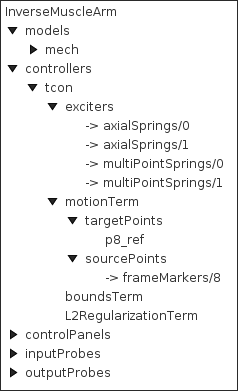
The tracking controller is a composite component, which contains the exciter list and the various cost and constraint terms as subcomponents. Some of these components are added as needed. They include the following, as described by their names:
- exciters
-
A list of references to the exciters which have been added to the controller. Note that this is a list of references; the exciters themselves exist elsewhere in the model. Always present.
- motionTerm
-
The MotionTargetTerm detailed in Section 10.2.2.1. Implements the motion cost term
 defined in
(10.11), and the motion tracker of
Figure 10.1. Allocates and maintains target components
for motion sources, storing the targets in the subcomponent lists targetPoints and targetFrames, and references to the sources in the
reference lists sourcePoints and sourceFrames. Always present.
- forceEffectorTerm
-
- boundsTerm
-
Implements the actuator bounds
 ,
where
 and
 are nominally
 and
 . Always present.
- L2RegularizationTerm
-
Implements the cost term for L2 regularization (Section 10.2.3.1). Added on demand.
- dampingTerm
-
Implements the cost term for excitation damping (Section 10.2.3.2). Added on demand.
 defined in
(
10.3.2 Controller properties
The controller and its cost terms have a number of properties that can be used to adjust the controller’s behavior. They can be set interactively, either through the inverse controller panel created by the InverseManager (Section 10.4.3), or by selecting the relevant component in the navigation panel and choosing "Edit properties ..." from the context menu. The properties can also be set in code, using the accessor methods supplied by their host component. These methods will usually be named getXxx() and setXxx() for property xxx. Properties of the tracking controller itself include:
- active
-
Controls whether or not the controller is active. Setting this to false turns the controller off. Default value is true.
- normalizeCostTerms
-
If true, normalizes the cost terms so that their weights (e.g.,
 ,
 , and
 in (10.15)) more accurately control the tradeoffs
between terms. Each term’s quadratic matrix
 is scaled to have unit
trace before its weight is applied, so that the effect of the weights is
approximately independent of the simulation step size
 , as well as of
the physical units and the masses of the model. However, since terms with
low-rank matrices (such as motion terms with fewer target coordinates
than exciters) concentrate this trace into fewer directions, the effective
ratio between weights still depends on the numbers of targets and exciters.
Also, when normalization is enabled, the motion and force term weights
and effectively enter the cost squared.
If false, no normalization is performed and all weights enter the cost
linearly, as in (10.15), but their effect depends on the step
size, physical units, and model masses, and so typically needs to be retuned
for each model (see also useTimestepScaling).
Default value is true.
- computeIncrementally
-
- refactorForIncremental
-
For incremental computation, controls whether the system solve matrix is refactored when computing each column of the excitation response matrices
 ,
 , etc. Refactoring accounts for the effect of the excitations on
the force derivatives used by the integrator, but has a computational cost
that is proportional to the number of exciters, and does not usually improve
tracking accuracy significantly. Default value is false.
- excitationBounds
-
Specifies the default excitation bounds for exciter components. Default value is
 .
- targetsVisible
-
Controls the visibility of the motion target terms contained within the controller, as described in Section 10.2.2.2. Default value is true.
- configExcitationColoring
-
If enabled, automatically configures exciters which support excitation coloring to vary from white to red as their excitation increases (Section 10.2.1.1). Default value is true.
- probeDuration
-
Default duration of probes managed by the InverseManager class (Section 10.4). Default value is 1.0.
- probeUpdateInterval
-
Default update interval of output probes managed by the InverseManager class (Section 10.4). Default value is -1, which means that the interval will default to the simulation step size.
- useKKTFactorization
-
Uses a more computationally expensive but possibly more accurate method to compute the excitation response matrices such as
and
(Section 10.1.3). Default value is false. - maxExcitationJump
-
Experimental property that limits the change in excitation during any time step. Default value is false.
- useTimestepScaling
-
If true, and normalizeCostTerms is false, then the quantities
and  of the motion term
(10.11), and the corresponding quantities of the
constraint force term, are scaled by
 , where is the simulation step
size. Since (the
velocity change per unit excitation over one step) is approximately
proportional to , this converts these terms from velocity errors into
acceleration errors, so that their size relative to the regularization terms
is approximately independent of . Without this, the motion term’s
quadratic matrix scales with
 , so that the effect of the regularization
weight increases as decreases. The weights remain dependent on the
model’s units and masses, and so may need to be tuned for each model.
This property has no effect when normalizeCostTerms is true,
since normalization already removes the dependence on
(and additional scaling would simply weaken the regularization terms by a
factor of ). Default value is false.
- debug
-
Enables debugging messages. Default value is false.
10.3.3 Motion term properties
The motion target term (Section 10.2.2.1) exports a number of properties that control motion tracking:
- enabled
-
Controls whether or not this term is enabled. Default value is true.
- weight
-
Specifies the weight
of this term relative to the other cost
terms. Default value is 1.0. - chaseTime
-
Specifies the chase time
 used for chase control
(Section 10.1.2.1). If the value is less than the current step
size , then is set to instead. Therefore, a value of 0 (the default)
ensures that
 .
- estimateTargetVelocity
-
If true, the velocity
 of each target whose velocity
property has not been set since the previous step is estimated from the
change in the target’s position over the step (Section
10.2.2). If false, unset target velocities are
assumed to be 0. Default value is true.
- usePDControl
-
Controls whether or not PD control is used (Section 10.1.2.2). Default value is false.
- Kp
-
Specifies the proportional gain
 for PD control
(Section 10.1.2.2). Default value is 2500.
- Kd
-
Specifies the derivative gain
 for PD control
(Section 10.1.2.2). Default value is 100.
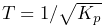
- pdTimeConstant
-
PD control time constant
 (Section
10.1.2.2). Setting this property sets Kp and Kd to
 and
 , where
 is the current damping ratio. This
property is derived from Kp and is not saved. Default value is 0.02.
- pdDampingRatio
-
PD control damping ratio
 (Section
10.1.2.2). Setting this property sets Kd to
 , leaving Kp unchanged. This property is derived from Kp and Kd and is not saved. Default value is 1.
- legacyControl
-
Controls whether or not legacy control is used. Default value is false.
10.3.4 Properties for other cost terms
All other cost terms, including the L2 regularization (Section 10.2.3.1), export the following properties:
- enabled
-
Controls whether or not the term is enabled. Default value is true.
- weight
-
Specifies the weight of this term relative to the other cost terms. Default value is 1.0.
