3.10 Attached frames
In the same sense that a Marker is a point attached to another dynamic component, an AttachedFrame is a coordinate frame attached to a dynamic component.
3.10.1 Frame attached frames
A FrameAttachedFrame is an AttachedFrame that is
rigidly connected to a master Frame (which includes
RigidBody as a subclass), in the same way that a FrameMarker is a point attached to a Frame. Once attached, the FrameAttachedFrame moves rigidly with its master frame. The relative pose of
the attached frame with respect to its master is described by the transform
 , referred to in the code examples as TFM.
FrameAttachedFrame objects can be created using a variety of constructors, including
| FrameAttachedFrame () | |
| FrameAttachedFrame (String name) | |
| FrameAttachedFrame (RigidTransform3d TFW) | |
| FrameAttachedFrame (Frame frame, RigidTransform3d TFW) |
where FrameAttachedFrame() creates a default frame with no master
assigned, FrameAttachedFrame(name) adds a name, and FrameAttachedFrame(TFW) initializes the world pose to TFW. The
last constructor also attaches the frame to frame, with
computed from the two frames’ current world poses. After construction,
the master frame can be set and queried using
| void setFrame (Frame frame) | |
| Frame getFrame () |
where setFrame(frame) computes from the attached frame’s
current world pose and the master’s world pose. The transform and
the world pose  can also be set and queried directly:
| RigidTransform3d getTFM () |
Returns |
| void setTFM (RigidTransform3d TFM) |
Sets |
| void setTFW (RigidTransform3d TFW) |
Sets |
Note there is no need for a getTFW() method because that is the same as
the frame’s getPose() method, whereas setTFW() differs from setPose(TFW) because the former updates to accommodate the new value
of , while the latter does not and so the frame will revert back to
the pose imparted by the master.
Created FrameAttachedFrame objects must be added to the MechModel. One way to do this is to add them to the model’s frames container, which is managed using the MechModel methods:
| void addFrame (Frame frame) |
Adds frame frame to the container. |
| boolean removeFrame (Frame frame) |
Removes frame frame from the container. |
| void clearFrames() |
Removes all frames. |
| RenderableComponentList<Frame> frames() |
Returns the frames container. |
FrameAttachedFrame objects can be added directly to a Frame component, which maintains an attachedFrames container as a subcomponent. Attached frames can be added to this list using
| void addAttachedFrame (FrameAttachedFrame frm) |
Adds an existing FrameAttachedFrame to a frame, setting its master to frame if necessary. |
| FrameAttachedFrame addAttachedFrame ( RigidTransform3d TFM) |
Creates a FrameAttachedFrame at pose |
| FrameAttachedFrame addAttachedFrameWorld ( RigidTransform3d TFW) |
Creates a FrameAttachedFrame at pose |
The attachedFrames container can be accessed and frames removed using
| RenderableComponentList<FrameAttachedFrame> getAttachedFrames () |
Returns the frame’s attachedFrames container. |
| boolean removeAttachedFrame ( FrameAttachedFrame frm) |
Removes frm from the container; returns true if it was present. |
| void clearAttachedFrames () |
Removes all frames from the container. |
3.10.2 Example: attached frames for a rigid body
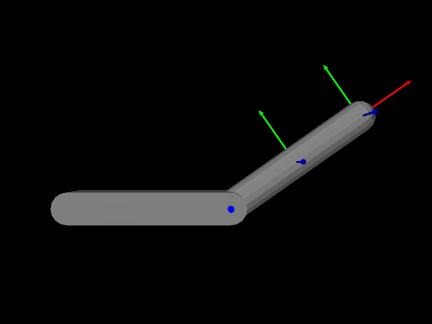
A model demonstrating the attachment of frames to a rigid body is defined in
artisynth.demos.tutorial.RigidBodyAttachedFrames
This subclasses RigidBodyJoint (Section 3.4.6) and
extends its build() method to add two FrameAttachedFrames to bodyA, one specified via and one via the world pose :
The first attached frame, frameAtTip, is created using addAttachedFrame(TFM), with placing it at the tip of bodyA
along its local  -axis. The second, frameAtCenter, is created using
addAttachedFrameWorld(TFW), with its world pose set to match the
current pose of bodyA, so it sits at the body’s origin. Both frames
are rendered as solid arrow triads (AxisDrawStyle.ARROW).
-axis. The second, frameAtCenter, is created using
addAttachedFrameWorld(TFW), with its world pose set to match the
current pose of bodyA, so it sits at the body’s origin. Both frames
are rendered as solid arrow triads (AxisDrawStyle.ARROW).
To run this example in ArtiSynth, select All demos > tutorial > RigidBodyAttachedFrames from the Models menu. The model should load and initially appear as in Figure 3.39. Running the model will cause bodyA to swing under gravity, with both attached frames moving rigidly with it.
![[LOGO]](data:image/png;base64,iVBORw0KGgoAAAANSUhEUgAAAAsAAAAOCAYAAAD5YeaVAAAAAXNSR0IArs4c6QAAAAZiS0dEAP8A/wD/oL2nkwAAAAlwSFlzAAALEwAACxMBAJqcGAAAAAd0SU1FB9wKExQZLWTEaOUAAAAddEVYdENvbW1lbnQAQ3JlYXRlZCB3aXRoIFRoZSBHSU1Q72QlbgAAAdpJREFUKM9tkL+L2nAARz9fPZNCKFapUn8kyI0e4iRHSR1Kb8ng0lJw6FYHFwv2LwhOpcWxTjeUunYqOmqd6hEoRDhtDWdA8ApRYsSUCDHNt5ul13vz4w0vWCgUnnEc975arX6ORqN3VqtVZbfbTQC4uEHANM3jSqXymFI6yWazP2KxWAXAL9zCUa1Wy2tXVxheKA9YNoR8Pt+aTqe4FVVVvz05O6MBhqUIBGk8Hn8HAOVy+T+XLJfLS4ZhTiRJgqIoVBRFIoric47jPnmeB1mW/9rr9ZpSSn3Lsmir1fJZlqWlUonKsvwWwD8ymc/nXwVBeLjf7xEKhdBut9Hr9WgmkyGEkJwsy5eHG5vN5g0AKIoCAEgkEkin0wQAfN9/cXPdheu6P33fBwB4ngcAcByHJpPJl+fn54mD3Gg0NrquXxeLRQAAwzAYj8cwTZPwPH9/sVg8PXweDAauqqr2cDjEer1GJBLBZDJBs9mE4zjwfZ85lAGg2+06hmGgXq+j3+/DsixYlgVN03a9Xu8jgCNCyIegIAgx13Vfd7vdu+FweG8YRkjXdWy329+dTgeSJD3ieZ7RNO0VAXAPwDEAO5VKndi2fWrb9jWl9Esul6PZbDY9Go1OZ7PZ9z/lyuD3OozU2wAAAABJRU5ErkJggg==)